My Selftape App
- 3.1
- Rating
- 10.00K
- Installs
- Free
- Price
 Analysis by App-foxy
When I tested My Selftape App, I approached it as a practical tool for actors who need to record an audition without turning the process into a small film-production project. Its promise is straightforward: capture the performance, make basic changes, encode the result, and send it from one app. That focus is useful, especially when the alternative is moving between a camera app, a video editor, a file manager, and an email or messaging service.
The app sits in the video players and editors category, but its real audience is narrower than that label suggests. I would look at it primarily as a self-tape utility for actors, students, coaches, and anyone who regularly has to submit a prepared performance. It is free to install, rated for Everyone, and developed by Apps For Actors Inc. The current version is 0.0.0.593, and it runs on Android 6.0 or later, so compatibility is reasonably broad for older devices.
My overall impression is mixed but useful. The all-in-one idea makes sense, and the uncomplicated workflow can save time when I already know what I want to record. At the same time, the app feels like a focused tool rather than a polished replacement for a full camera and editing setup. Its average rating is 3.1 from around 64 ratings, with around 11 written reviews, and that modest reception matches my experience: there is a helpful core concept here, but the experience rewards patience and a repeatable routine.
You May Also Like

 Pandora - Music & Podcasts
Pandora’s Music Is Easy to Start, but Harder to Recover
Pandora’s strength is its low-effort path from a seed to a station. Its weak spot is how much confidence it asks you to place in connection, setup, and quiet recovery.

 AccuWeather: Weather Radar
AccuWeather Review: A Quick, Clear Forecast for Everyday Decisions
For everyday plans, the best forecast is the one you can understand quickly. AccuWeather makes rain timing, radar, and local conditions easy to act on, with a few trade-offs.

 Hill Climb Racing
Why Hill Climb Racing Still Turns Crashes Into One More Run
A tiny car, a bumpy hill and one more upgrade: Hill Climb Racing keeps resurfacing because its simple chaos makes every near-miss feel personal.

 AliExpress - Shopping App
AliExpress Makes Global Shopping Feel Personal, but Shoppers Bear the Risk
AliExpress turns a global marketplace into a pocket-sized discovery engine. Its reach is useful, its shopping loop compelling, and its trade-offs easy to miss.

 Lords Mobile: Kingdom Wars
Lords Mobile Is a Kingdom-Building Routine, Not a Quick Match
A case-by-case verdict on the building, battles, device demands, and social commitments that make Lords Mobile rewarding for some players and exhausting for others.

 PDF Scanner app - TapScanner
TapScanner Makes Paperwork Easier to Capture, Check, and Share
TapScanner makes scanning with a phone feel less like a rescue operation and more like a dependable step in getting work done. Its capture tools are useful, though not flawless.
More From Our News Desk
View All News


How I use it for a complete self-tape
I get better results by treating the app as the final recording station, not as a place to improvise every decision. Before opening it, I prepare the script, choose the background, check the light, and decide whether the phone will be vertical or horizontal. That preparation matters because a self-tape app can simplify recording, but it cannot correct distracting shadows, noisy surroundings, or a poorly framed performance.
My baseline workflow is simple. I open the app, prepare the shot, record a take, review it, make only the necessary edits, encode the finished clip, and then send it. The important habit is reviewing the complete take before making changes. It is easy to focus on a missed line or a small movement and forget to check whether the beginning and ending feel clean, whether the voice remains understandable, and whether the final file starts and stops where it should.
For a normal audition, I would record several takes rather than trying to repair one weak performance. Editing is valuable for trimming unwanted material, but it should not become a substitute for another take. A clean, natural performance usually matters more than a heavily adjusted clip. I also keep the original take until I am certain the edited version is the one I want to send, because replacing a file too early creates unnecessary stress.
The app’s record-edit-encode-send approach is most useful when the submission needs to happen quickly. Imagine receiving a request for a short audition while away from a computer. I can set the phone on a stable surface, frame myself, record the scene, remove the awkward setup at the beginning and end, encode the result, and send it without first transferring the video to another device. That is a realistic advantage over a camera app that leaves every later step to me.
I would still rehearse outside the app. A phone screen is not the ideal place to manage a script, watch framing, and monitor a performance at the same time. If I need a reader, I arrange that before recording. If I am working alone, I use a separate, familiar method for keeping the lines available rather than assuming that the recording tool will solve every part of the audition process.
What I check before pressing record
My first check is framing. I leave enough space around the head and shoulders without making the actor appear distant. I also look at the background for anything that competes with the face. A plain wall is often better than a visually busy room, but a completely dark or poorly lit background can flatten the image. The app can capture the take, yet the room still determines much of the result.
My second check is sound. I record a short test and listen to it before committing to a full scene. This catches common problems such as air-conditioning noise, a phone placed too far away, or a voice that is clear in the room but weak in the recording. This small test is one of the most useful habits I can recommend because editing cannot restore words that were never captured clearly.
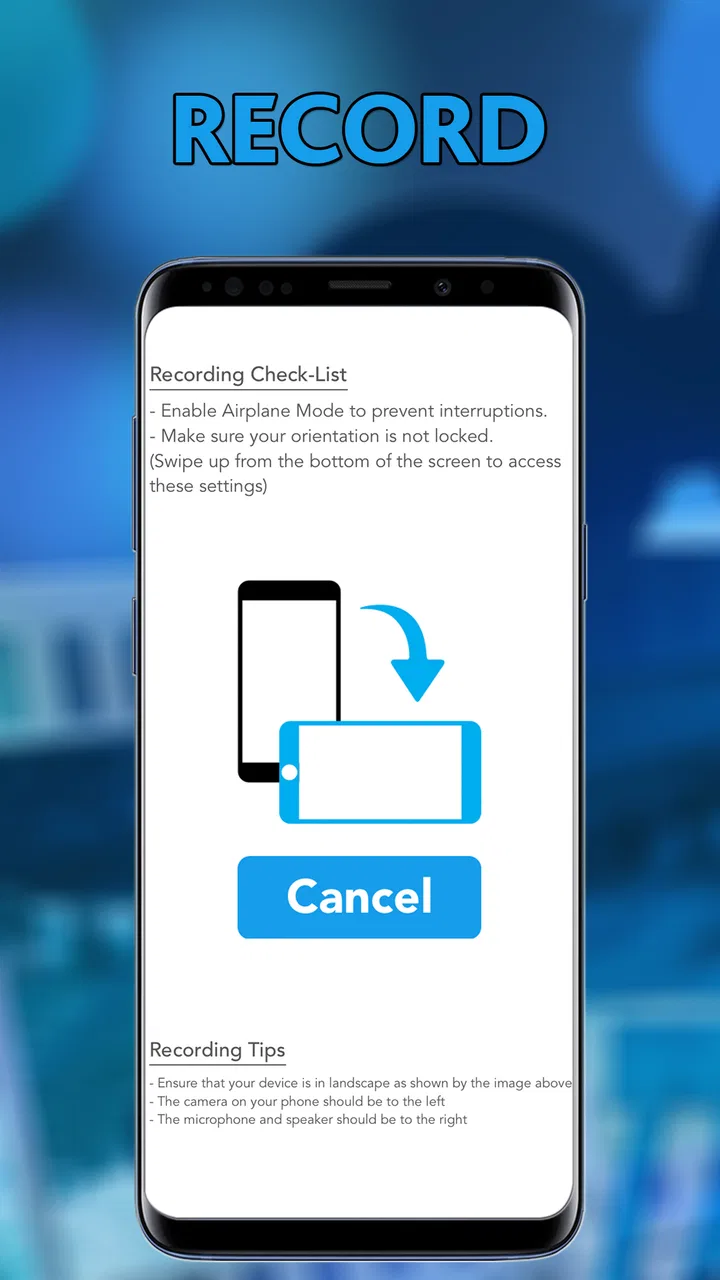
My third check is the phone position. Handheld recording is rarely a good choice for a self-tape. A stable support keeps the image consistent between takes and lets me concentrate on the performance. I also avoid changing the camera position halfway through a session unless the instructions specifically call for it. Consistency makes comparing takes much easier.
Settings and repeatable habits that save time
I do not approach every setting as something that must be adjusted. Experienced use is often about finding a dependable arrangement and leaving it alone. I check the available recording and output choices before the important take, then use the same setup for the rest of the session. This reduces the chance of producing several clips that differ in orientation, framing, or file behavior.
One practical rule is to decide the delivery format before recording. If the recipient expects a certain orientation or a particular way of receiving the file, I build that requirement into the setup rather than trying to fix it afterward. Repeatedly rotating, re-encoding, or moving clips between apps can create confusion. My preferred sequence is to make one short test, confirm that the result looks and sounds right, and then record the real material.
I also keep edits conservative. The most useful edit is usually removing the few seconds before the performance begins and the few seconds after it ends. That makes the clip easier to review and avoids sending a file filled with setup chatter. I would not use this app as my main tool for elaborate cuts, layered effects, or a highly designed presentation. Its value is in completing a straightforward self-tape efficiently.
Another good habit is naming or organizing files immediately after a take when the workflow allows it. I use a consistent pattern based on the scene or audition rather than relying on memory. That becomes especially important when several versions look similar in the device’s gallery. A self-tape tool can help create the video, but disciplined file handling prevents the wrong take from being sent.
The app is free, although in-app purchases range from $4.99 to $19.99 per item. I would therefore explore the basic workflow before paying for anything. The sensible question is not simply whether an extra option exists, but whether it removes a problem I actually encounter. Someone who records one occasional audition may have no reason to spend more, while a frequent actor may find a paid option worthwhile if it directly supports a repeated workflow.
I also pay attention to the app’s age and version context. It was released on October 20, 2016, and the current version remains identified as 0.0.0.593. That does not automatically make it unusable, but it does shape my expectations. I would test the entire path from recording to sending on my own phone before depending on it for a deadline. A short rehearsal of the workflow is more valuable than discovering a device-specific inconvenience when the submission window is closing.
Faster patterns for frequent recording
The fastest pattern I found is to separate preparation from capture. I prepare the room, script, clothing, and phone position first. Then I open the app only when I am ready to record. This prevents the recording session from becoming a long sequence of adjustments and reduces the temptation to judge every small detail while performing.
For multiple scenes, I record in a planned order and review in batches. After each take, I make a quick note about which version felt strongest. I do not immediately perform a full edit on every attempt. Instead, I compare the promising takes, select the best one, and then trim it. This is faster and helps me judge the acting rather than becoming distracted by repeated export steps.
A second efficient pattern is to create a short “technical take” before the real one. I use it to confirm framing, voice clarity, and the general look of the image. If something is wrong, I fix it before investing energy in the performance. This is particularly helpful when recording alone, because the person operating the phone is also the person who needs to appear relaxed on camera.
A third pattern is keeping the final communication simple. Once the clip has been edited and encoded, I check the beginning, middle, and end rather than watching it casually in the background. I want to know that the file opens, the performance is complete, and the result is the intended take. Then I send that file through the required channel. The app can reduce the number of steps, but it does not remove the need for a final human check.
These habits are more important than trying to discover a clever shortcut. I would not promise a reader that the app will automatically make a professional self-tape. Its strength is reducing tool switching. The quality still comes from preparation, stable recording, understandable sound, and a performance that does not need excessive correction.
Where the all-in-one approach reaches its limits
The biggest trade-off is control. A dedicated camera app may offer a more familiar capture experience, while a full editor may provide more precise trimming and broader output choices. A file manager or cloud service may also be better for organizing many auditions. My Selftape App is attractive when I want one focused path, but that convenience matters less if I already have a reliable setup that I understand well.
I would skip it for projects that need detailed post-production. If the video requires multiple angles, complex sound work, captions, visual effects, color correction, or a carefully designed presentation, I would move to a more capable editor. The app is better suited to a clean, direct audition clip than to a finished short film or a social video with several creative layers.
I would also be cautious about using it as the only plan for an important deadline until I had tested it on my particular device. Android phones vary widely in camera behavior, storage, and sharing workflows. The minimum operating-system requirement is Android 6.0, but meeting that requirement does not guarantee that every phone will feel equally smooth. My advice is to record a harmless test, edit it, encode it, and send it to yourself before relying on the app for a real submission.
Another limitation is that the store-facing identity is somewhat confusing for a modern reader. The short description is “My Selftape App,” while the longer summary describes a complete record, edit, encode, and send process. I understand the intended purpose quickly, but I would still prefer clearer guidance inside the workflow about what each stage changes and when a file is ready to share. For new users, uncertainty at the export stage can be more frustrating than the recording itself.
The audience rating of Everyone makes the app broadly approachable, but that does not mean it is equally suitable for every user. A beginner who wants a guided studio experience may prefer a newer camera or teleprompter-oriented tool. An actor who already owns a strong camera, microphone, and editing workflow may gain little from switching. The best match is someone who values an uncomplicated mobile path and is willing to do the creative preparation personally.
Who gets the most value from it
I see the strongest fit for actors making regular self-tapes on an Android phone, especially when portability matters more than advanced production control. It can also suit drama students, audition coaches demonstrating a scene, and performers who need to send a clean clip without sitting at a computer. The app’s focused purpose is easier to appreciate when the job is repetitive and time-sensitive.
It is less convincing for casual users who only need to record a one-off video. The standard camera app may already be enough, and a familiar editor may be easier if the user wants only a quick trim. Likewise, people who need extensive file organization or professional audio handling should not choose this solely because it combines several stages in one place.
I would recommend a trial run before deciding whether it belongs in a regular routine. Record a short scene, make a modest trim, encode it, and send the result. If that sequence feels natural and produces a file that meets the recipient’s expectations, the app may become a useful part of the process. If the same task feels less clear than using separate tools, the all-in-one design is not providing a real advantage.
My verdict after building a routine around it
My Selftape App is a practical, narrowly focused app with a sensible purpose. I like that it treats a self-tape as a complete task rather than stopping at camera capture. The ability to move from recording through editing, encoding, and sending can remove several small obstacles, and those obstacles add up when auditions are frequent.
My recommendation comes with conditions. I would use it for straightforward audition clips, after testing the workflow on my phone and establishing a consistent recording routine. I would keep the edits restrained, protect the original take, and verify the final file before sending. I would not choose it for elaborate video work, heavy organization, or situations where dependable advanced controls matter more than convenience.
In short, the app works best as a repeatable self-tape station, not as a complete professional video suite. Its free entry point makes experimentation easy, while the available in-app purchases mean I would only spend money after identifying a specific need. If you want a compact way to record and prepare auditions on Android, it is worth trying. If you want maximum control or a polished modern editing environment, a combination of dedicated tools will probably serve you better.
FAQs for My Selftape App
01What is the My Selftape app used for?
My Selftape is designed to help actors, performers, and creators record professional-looking self-tape auditions directly from a mobile device. It can guide you through recording, reviewing, and organizing audition videos without requiring a separate camera or complex editing software. The app is especially useful when you need to prepare and submit a self-tape quickly while keeping your performance, framing, and audio consistent.
02Can I record a complete audition self-tape with My Selftape?
Yes, the app is intended to support the main stages of creating a self-tape, including preparing your scene, positioning the phone, recording your performance, and checking the final result. Depending on the version and device, available tools may include multiple takes, scene organization, playback, and basic adjustments. It is still important to test your lighting, background, microphone, and camera placement before recording an important audition.
03Does My Selftape work on both Android and iPhone?
Availability can depend on the current release, country, and device compatibility, so you should check the official Google Play Store or Apple App Store listing before downloading. Make sure your phone meets the stated operating-system requirements and has enough storage for video files. Some features may also behave differently between Android and iOS because camera access, audio processing, and file-sharing options vary by platform.
04Is My Selftape free to download and use?
The app may be available as a free download while offering optional paid features, subscriptions, or in-app purchases. Before starting a recording workflow, review the store page carefully for pricing, trial conditions, renewal terms, and any limitations placed on exports or advanced tools. If a free trial is offered, remember to cancel it through your device’s subscription settings if you do not want it to renew automatically.
05What should I check before submitting a video recorded with My Selftape?
Before sending an audition, watch the entire video with headphones and confirm that your voice is clear, the image is properly framed, and there are no unwanted interruptions, notifications, or background noises. Check that the file format, resolution, duration, and file size match the casting instructions. You should also verify the actor’s name and scene title, then save a backup copy before uploading or sharing the final recording.
Pros
- Simple interface makes recording auditions quick and easy.
- Supports multiple takes
- helping you compare performances before sharing.
- Built-in tools can improve framing and presentation quality.
- Useful for actors submitting auditions remotely and on short deadlines.
- Keeps self-tape preparation organized in one dedicated app.
Cons
- Some useful features may require a paid subscription or in-app purchase.
- Video processing and uploads can take time on slower connections.
- Storage use may grow quickly when saving several high-quality takes.
- Limited editing options compared with professional video-editing apps.
- Performance may vary between devices with different cameras and hardware.

My Selftape App
Gallery